Cacoo
Overview
Cacoo is a collaborative tool for developing graphic organizers, mind maps, and diagrams. This straightforward application enables users to craft diagrams, charts, and sequences suitable for any graphic organizer while facilitating real-time collaboration during the creation process. A key advantage is the ability to embed finalized diagrams into online documents, with all modifications appearing instantly to ensure viewers always see the most current version.
Getting Started
After registration, users encounter a blank diagram workspace. The left sidebar contains user folders and account settings, while the top right features a button to initiate new diagrams. The toolbar includes standard graphing program functions: undo, redo, copy, cut, paste, text, shapes, free hand, and insert image. Four additional features merit attention:
- Stencil: Access pre-designed shapes and templates
- Chat: Communicate with collaborators in real time
- Inspector: Fine-tune visual properties like line color and thickness
- Edit History: Track diagram changes (paid plans only)
Users can add elements by clicking and dragging objects onto the canvas, then editing, resizing, or coloring them. Images can be incorporated by uploading files, entering URLs, or capturing screenshots. Completed diagrams can remain private or become publicly accessible. Embedding on class blogs, wikis, or websites requires simply copying the embed code or diagram URL.
Example
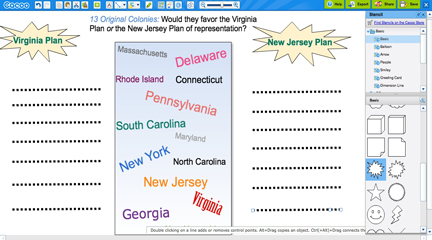
Multiple students can simultaneously share and edit a single diagram with real-time edits, similar to Google Docs functionality. Potential uses include group activities where students collaborate on visual projects, teacher curriculum planning requiring specific graphic organizers, and transforming static paper worksheets into dynamic visual displays on class websites or wikis.